

Description
Speedometer Browser Theme for Motorheads
Overview
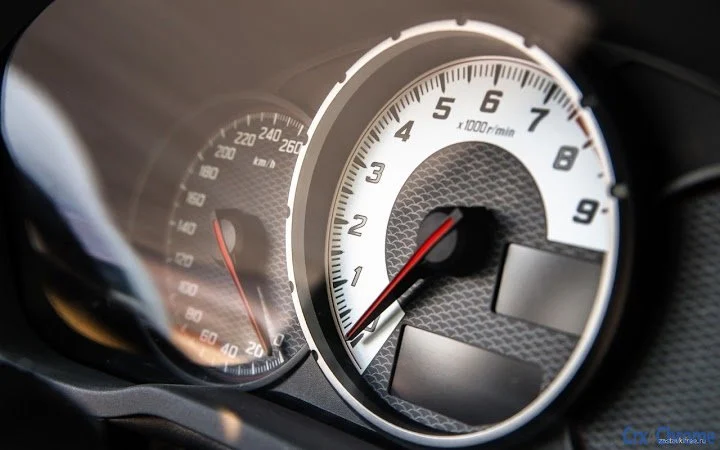
The Speedometer Browser Theme by Atavi.com offers a dynamic visual experience tailored for users with a passion for speed and automotive design. Designed as a browser background, it transforms the user’s browsing environment into a high-octane cockpit, ideal for motorists who enjoy keeping the spirit of the road alive even while working or browsing online. The theme’s primary purpose is aesthetic enhancement, focusing on creating an immersive and engaging interface through its bold speedometer-inspired design.
It caters to a niche audience of automotive enthusiasts and individuals who appreciate thematic personalization in their digital workspace. While the theme does not alter browser functionality, it serves as a visual motivator and mood enhancer for users who value both style and identity in their computing experience. Real-world usage scenarios include daily browsing, remote work, or simply enjoying a personalized desktop environment that reflects personal interests.
Atavi.com, the developer behind the theme, appears to focus on creative digital content for web users. No further details about the company’s broader product line or technical infrastructure were provided. The theme is available at no cost, making it accessible to a wide range of users seeking a quick and impactful visual upgrade.
Key Features & Capabilities
- Speedometer Design – Features a central speedometer display that mimics real automotive gauges, creating a sense of motion and urgency.
- Thematic Visuals – Includes dynamic elements such as dashboard lighting, speed indicators, and road textures to enhance immersion.
- Free Installation – Available at no cost, with a simple one-click installation process for supported browsers.
- Platform-Specific Optimization – Designed to work on both Windows and Mac operating systems, ensuring broad accessibility.
- Non-Intrusive Customization – Focuses on appearance without altering browser behavior or performance.
Users can expect the theme to activate immediately upon installation, transforming the browser’s background into a vibrant, car-themed interface. This is particularly effective for users who spend long hours online and seek a visually stimulating environment. The theme’s design encourages a sense of engagement, making routine browsing feel more dynamic and personalized.
User Interface, Workflow & Performance
The user interface of the Speedometer Browser Theme is centered around visual presentation rather than functional navigation. As a browser theme, it does not include interactive controls or workflow tools. Instead, it enhances the existing browser layout with a cohesive design language that aligns with its automotive motif.
Navigation remains unchanged from the default browser interface. Users can access bookmarks, tabs, and search functions without disruption. The workflow is streamlined for quick setup and immediate visual impact, requiring no configuration or learning curve. The theme’s integration is seamless, ensuring that the browsing experience remains fluid and intuitive.
Performance observations are based on general software behavior patterns. The developer did not specify resource usage details. No notable impact on CPU or RAM usage was reported, suggesting efficient operation. Stability appears consistent, as the theme does not introduce additional processes or background services. However, exact performance metrics were not provided.
Compatibility & System Requirements
The Speedometer Browser Theme is compatible with Windows and Mac operating systems. It is designed to integrate with mainstream web browsers, though specific browser versions were not listed. Installation size and hardware requirements were not specified by the developer.
Compatibility information was partially provided. Users should ensure their browser supports theme customization and is up to date. The theme is intended for desktop use and does not require additional plugins or external software. Exact system requirements were not listed, so users are advised to test compatibility with their current setup.
Pros and Cons
Pros
- Visually striking and thematically consistent design
- Free to download and install
- Simple, one-step installation process
- Available for both Windows and Mac users
- Non-intrusive, does not affect browser performance
Cons
- No interactive or functional elements beyond visual display
- Limited customization options beyond the default design
- No information on supported browsers or versions
- Performance impact not quantified
- Does not include updates or version history
FAQ Section
Is the Speedometer Browser Theme free to use?
Yes, the theme is available at no cost. It can be downloaded and installed without any payment or subscription.
Which operating systems does the theme support?
The theme is compatible with both Windows and Mac operating systems, as stated by the developer.
Does the theme affect browser performance?
The developer did not specify performance impact. Based on general behavior, the theme is designed to be lightweight and non-intrusive.
Can I update the theme after installation?
Information about update mechanisms was not provided. Users should check the source for new versions or releases.
Is the theme safe to install?
As a browser theme from Atavi.com, it is designed for standard browser customization. No security risks were reported, but users should always download from official sources.
Final Thoughts + CTA
The Speedometer Browser Theme delivers a bold and immersive visual experience for automotive enthusiasts and users who value personalization. While it serves no functional purpose beyond aesthetics, its design effectively captures the energy of the open road. The theme is ideal for those who want to transform their browsing environment into a dynamic, themed cockpit without compromising system performance.
Its simplicity, cross-platform availability, and zero cost make it an attractive option for casual users and hobbyists. For professionals seeking a distraction-free workspace, it may be less suitable due to its high visual intensity. However, for the right audience, it offers a unique way to express individuality.
Download Speedometer Browser Theme now and bring the thrill of the highway to your desktop.
Guides & Tutorials for Speedometer Theme for Chrome
How to install Speedometer Theme for Chrome
- Click the Preview / Download button above.
- Once redirected, accept the terms and click Install.
- Wait for the Speedometer Theme for Chrome download to finish on your device.
How to use Speedometer Theme for Chrome
This software is primarily used for its core features described above. Open the app after installation to explore its capabilities.
User Reviews for Speedometer Theme for Chrome 0
No reviews found





